

During productionization, legal flagged Neo4j Community’s GPLv3 license. We needed something Cypher-compatible, Apache 2.0, and swappable without rewriting a complex pipeline. Here’s what that search looked like.
The licensing wall nobody warned us about
We’d been building a Graph RAG pipeline for a while. Neo4j at the center, knowledge graphs for entity relationships, Cypher queries feeding context to the LLM. It worked well in development and staging. Then, as we moved toward productionization, our legal team flagged it.
Neo4j Community Edition is GPLv3. If your org has a FOSS policy with restrictions around copyleft licenses, particularly GPLv3 , you know the drill. Legal won’t greenlight it without approval chains that move slower than the release schedule. Enterprise Neo4j is Apache 2.0, but that license costs money.
We needed a drop-in alternative. The requirements were non-negotiable:
Apache 2.0 or MIT licensed
Cypher query language support
Bolt protocol (we weren’t rewriting driver code)
Docker-deployable
Minimal code changes, we had a complex pipeline where multiple agents interact with db via api calls
After looking at FalkorDB, MemGraph, and a few others, we landed on ArcadeDB. Multi-model, Apache 2.0, and…crucially the Bolt protocol support landed in their 26.2.1 release. Let me share what that migration actually looked like.
Quick note on Neo4j licensing: Neo4j Community Edition (the free Docker image most people use) is GPLv3. Neo4j Enterprise is Apache 2.0 but requires a commercial license. If your org’s open-source policy restricts copyleft at the application layer, Community Edition will get flagged. Always verify with your legal team before you’re deep into a build.
What is ArcadeDB, exactly?
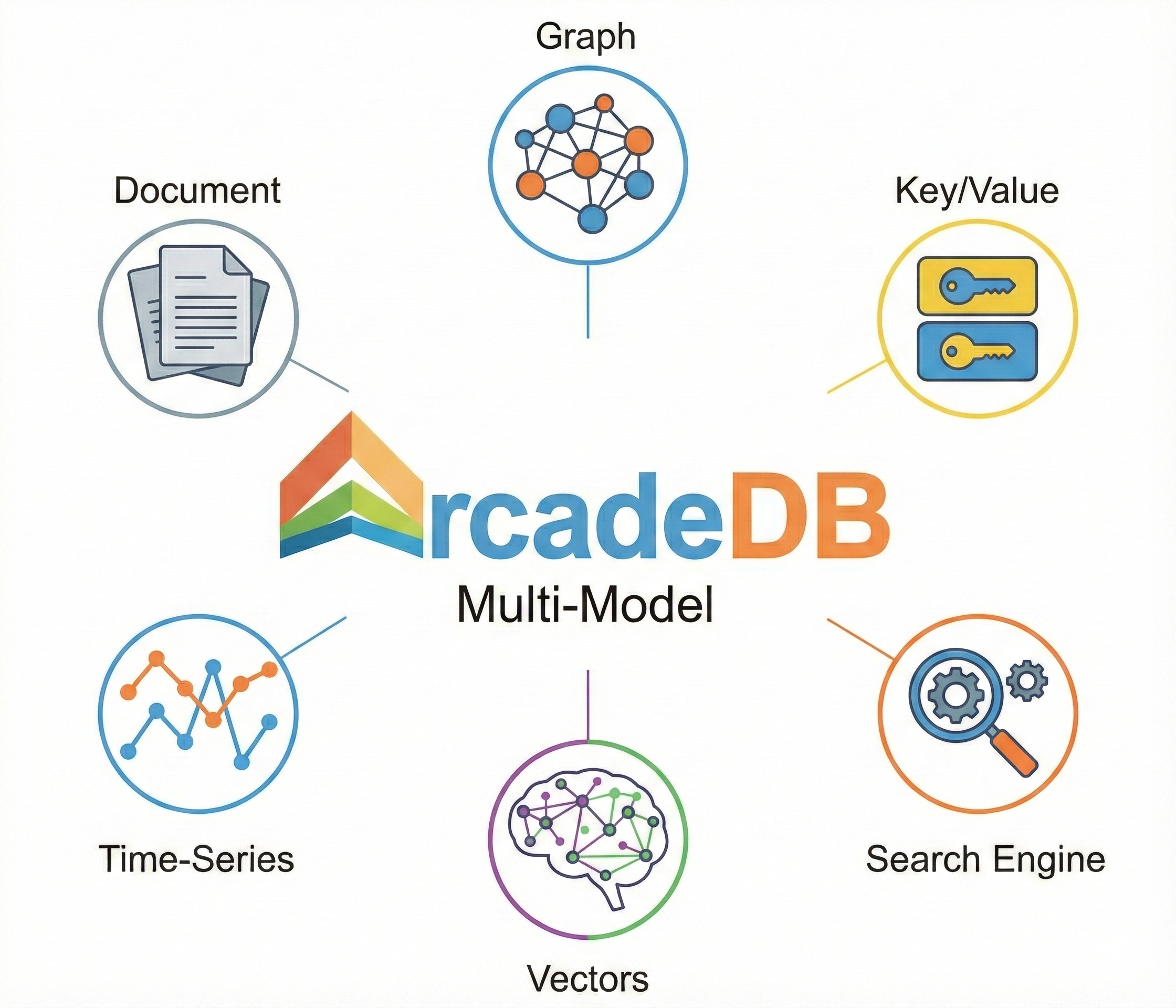
ArcadeDB is a multi-model database, one engine that handles multiple data models: graph, document, key-value, vector, time-series. It speaks SQL, Cypher, Gremlin, GraphQL, MongoDB QL, and Redis commands all through the same core. It’s a conceptual fork of OrientDB (acquired by SAP), rewritten from scratch by OrientDB’s original founder. License: Apache 2.0, no asterisks.
For our use case, the critical thing is that ArcadeDB’s Cypher implementation passes about 97.8% of the official OpenCypher TCK (uses OpenCypher Grammar version 25). In practice, that meant our MATCH queries, MERGE operations, and relationship traversals all ran without modification. The Bolt protocol support means the standard Neo4j Python driver just... connects to it.
Why multi-model matters for Graph RAG
Most Graph RAG systems end up being more than just a graph. You have document chunks that need storing, entities that live as graph nodes, embeddings that need vector similarity search, and sometimes metadata around ingestion. In Neo4j you’d typically reach for separate infrastructure for each of these. ArcadeDB handles them in one engine.
The practical shape of this in a Graph RAG pipeline:
Graph traversal: multi-hop entity relationships via the same Cypher you already write
Vector index (
LSM_VECTOR): semantic chunk retrieval viavectorNeighbors(), no separate vector store neededDocument model: raw chunks stored alongside their embeddings and graph links
Full-text search: keyword-based fallback retrieval, built in
We haven’t moved our vector layer into ArcadeDB yet — that’s a future step — but it’s genuinely interesting that the option exists. For teams starting greenfield, consolidating graph and vector in one store could simplify the architecture considerably.
One thing to be clear about: Multi-model sounds like marketing until you see a Graph RAG architecture diagram with four separate services where ArcadeDB could be one. It doesn’t mean consolidate everything on day one, but the option changes how you think about long-term design.
The GUI: ArcadeDB Studio vs Neo4j Browser
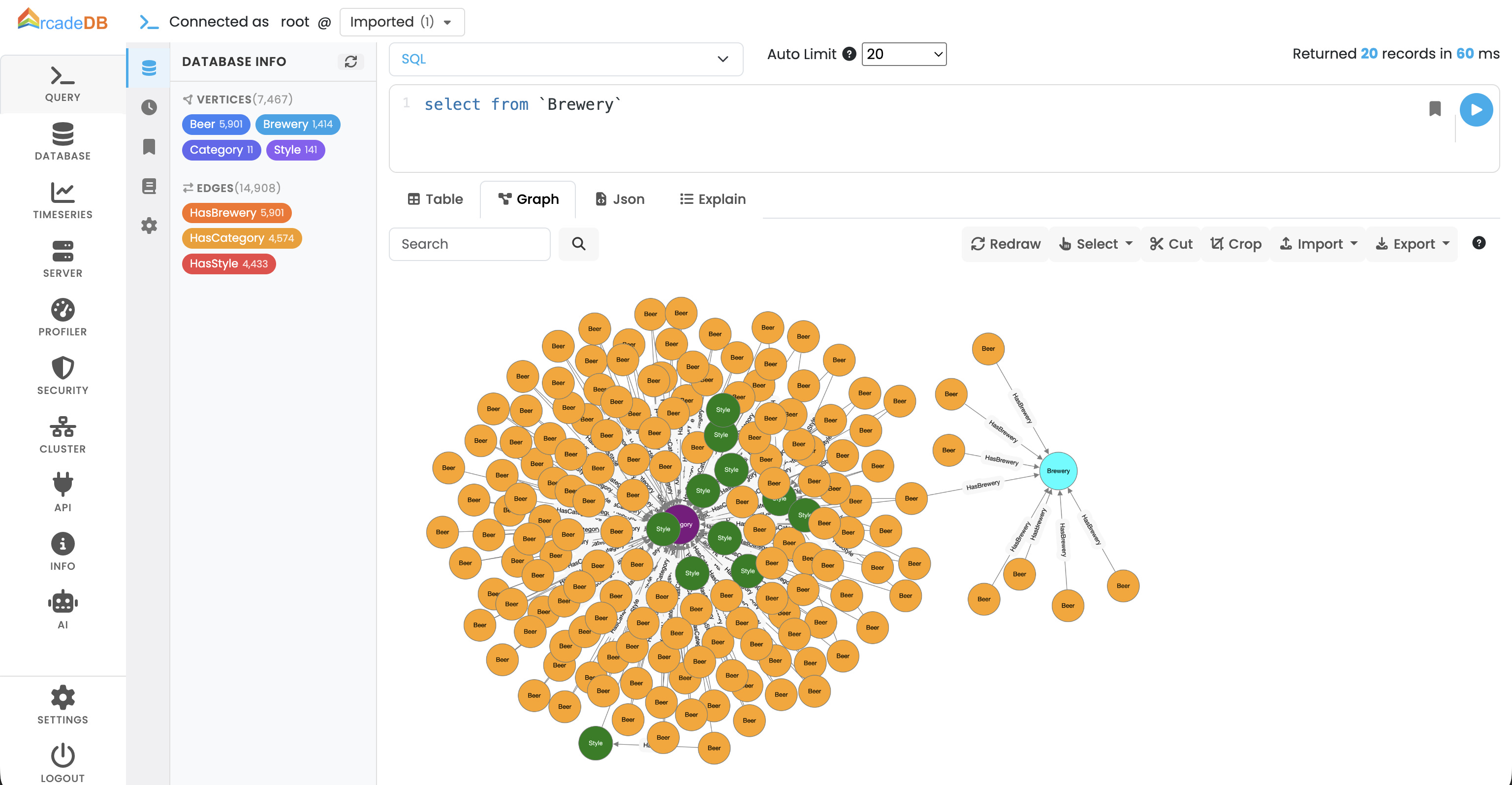
One thing people don’t think about when swapping databases is the day-to-day tooling. Neo4j Browser is genuinely good. The query editor, graph visualization, schema introspection, all in one place at localhost:7474. You get used to it fast.
ArcadeDB ships Studio, accessible at localhost:2480. It covers the same ground and then some. What you get out of the box:
Multi-language query editor with syntax highlighting and run Cypher, SQL, Gremlin, or GraphQL from the same interface, not just one language
Interactive graph visualization with nodes and edges render visually from query results, with element customization
Schema browser- type listing, property definitions, index and constraint management per type
Query history and saved queries- navigable history panel and the ability to bookmark queries you run repeatedly
Server and database metrics- request/min charts, CRUD and transaction operation counts, concurrent modification tracking. Neo4j Community doesn’t give you this; you’d need Neo4j Enterprise or external tooling
User and group management panel-centralized security controls built into the UI
AI Assistant (Beta)- integrated assistant for query help, profiler analysis, and agentic database management. Still beta, but notable for teams building AI-adjacent systems
Model Context Protocol (MCP) Server: ArcadeDB now includes a built-in MCP server, allowing external LLMs and AI agents (like Claude Desktop or custom agents) to interact with the database directly using a standardized protocol
Honest comparison: Neo4j Browser has a more polished, mature feel and a larger base of tutorials written against it. Studio is functional and improving quickly, but if you rely on obscure Browser features or have team members who know Neo4j Browser deeply, expect a short adjustment period and not a long one.
Swapping the Docker container
This was the first thing we did, get ArcadeDB running alongside Neo4j so we could validate behavior before cutting over. The key constraint: Neo4j was already occupying port 7687 (Bolt). We ran both in parallel temporarily.
Original Neo4j compose block:
neo4j:
  image: neo4j:latest
  container_name: neo4j
  ports:
    - "7474:7474"   # Browser UI
    - "7687:7687"   # Bolt
  environment:
    - NEO4J_AUTH=neo4j/test123
  volumes:
    - neo4j-data:/data
    - neo4j-logs:/logs
ArcadeDB equivalent, with Bolt on 7688 to avoid the port clash:
arcadedb:
  image: arcadedata/arcadedb:latest
  container_name: arcadedb
  ports:
    - "2480:2480"   # Studio (GUI — equivalent of Neo4j Browser)
    - "2424:2424"   # Binary protocol
    - "7688:7687"   # Bolt on host 7688 — avoids conflict with Neo4j
  environment:
    - JAVA_OPTS=-Darcadedb.server.rootPassword=test123
        -Darcadedb.server.defaultDatabases=GraphRAG[root]
        -Darcadedb.server.plugins=Bolt:com.arcadedb.bolt.BoltProtocolPlugin
  volumes:
    - arcadedb-data:/home/arcadedb/databases
    - arcadedb-logs:/home/arcadedb/log
  networks:
    - app-network

# top-level volumes block
volumes:
  arcadedb-data:
  arcadedb-logs:
Gotcha… Bolt is a plugin: Unlike Neo4j where Bolt is baked in, ArcadeDB ships Bolt as an opt-in plugin. The
JAVA_OPTSline enabling it is not optional — without it, nothing connects on port 7687. This only landed in ArcadeDB 26.2.1, so make sure you’re on that version or above.
Once you’re confident ArcadeDB is solid, cutting over is just stopping Neo4j and changing 7688:7687 back to 7687:7687. Your application’s connection string never changes.
Port map while running both in parallel:
What changed in the driver code
We were using the standard Neo4j Python driver across the whole pipeline. Since ArcadeDB speaks Bolt natively, the driver didn’t change at all and same GraphDatabase.driver(), same session.run(), same record.data(). Every MATCH, MERGE, CREATE, UNWIND, DETACH DELETE — all ran untouched.
The only real code changes were in schema management utilities and specifically the functions that listed and dropped indexes and constraints. Neo4j uses admin Bolt commands for this:
# These Neo4j-specific admin commands don't work over ArcadeDB's Bolt
result = tx.run("SHOW CONSTRAINTS")  # ❌ not supported
result = tx.run("SHOW INDEXES")      # ❌ not supported
ArcadeDB exposes schema metadata as queryable virtual tables via its SQL engine. The fix was clean:
# ArcadeDB exposes schema as virtual SQL tables
indexes = session.run("SELECT name FROM schema:indexes")
constraints = session.run("SELECT name FROM schema:constraints")

# Drop by name — backticks handle ArcadeDB's bracket notation in index names
tx.run(f"DROP INDEX IF EXISTS `{name}`")
tx.run(f"DROP CONSTRAINT IF EXISTS `{name}`")
That was it. The entire migration surface area on the code side was three functions in one file.
How much data are you dealing with? Pick accordingly
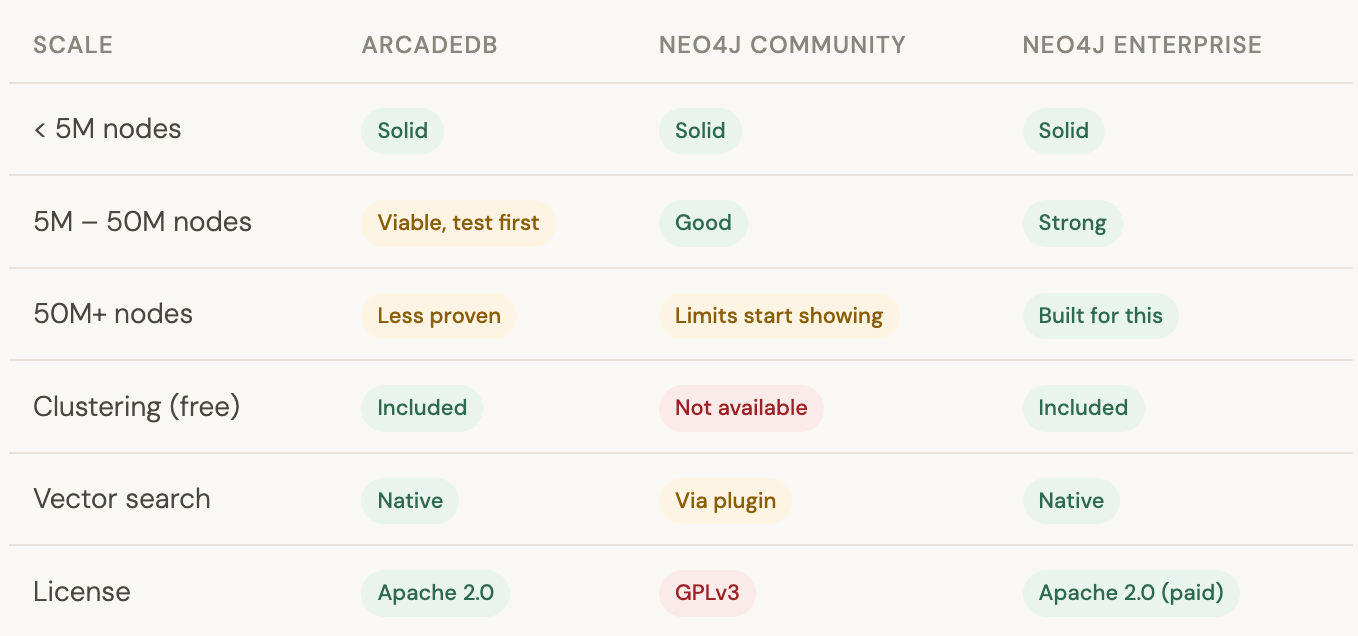
This is where honest guidance matters more than hype. ArcadeDB and Neo4j have different performance profiles depending on scale.
Under a few million nodes: ArcadeDB holds up well. It uses an LSM-tree based storage engine with low GC pressure (they call it “Low Level Java” essentially writing Java to minimize garbage collection overhead). For typical Graph RAG knowledge graphs entities, relationships, document chunks this range is comfortable. Response times on parameterized Cypher queries are comparable to Neo4j Community in our testing.
Tens of millions of nodes: Neo4j has years of optimization at this scale and mature index infrastructure. ArcadeDB can handle it, but you’re in less-documented territory. If you’re planning to grow into this range soon, factor that in and run your own benchmarks first.
Hundreds of millions+ nodes: Neo4j Enterprise was built for this and has the benchmarks, tooling, and support to back it up. ArcadeDB’s clustering is included free (notable — Neo4j charges for this), but the operational maturity at extreme scale isn’t comparable yet.
For our Graph RAG pipeline hundreds of thousands of entity nodes, a few million relationship edges, document chunks in the low millions and ArcadeDB sat comfortably in the right zone.
The honest pros and cons
After spending time validating ArcadeDB against our existing pipeline, here’s the unfiltered take:
What works well:
Apache 2.0.. so fully FOSS compliant
Bolt + standard Neo4j driver work as-is
Cypher TCK compliance is genuinely high (~97.8%)
Studio UI is functional and improving fast
Multi-model is a real future bonus as graph, vector, document, time-series in one engine
Clustering included free (Neo4j charges for this)
Lighter on resources than Neo4j
Pain points:
Bolt support is new and edge cases may exist
SHOW CONSTRAINTS/SHOW INDEXESnot supported via BoltSome Neo4j APOC procedures have no equivalent
Documentation gaps compared to Neo4j’s
Plugin ecosystem is immature
Java-based, heavier base image than you might expect
Would I recommend it?
If your situation matches ours where GPLv3 is a blocker, you’re using standard Cypher without heavy APOC dependency, and you need something that works without a rewrite then yes, ArcadeDB is a genuinely viable path. The Bolt support, while new, held up well in our validation runs.
If you’re building something greenfield and have the budget, Neo4j Enterprise or a managed graph service might still be the safer choice purely for ecosystem maturity. ArcadeDB’s community is growing but it’s not Neo4j-sized yet. You’ll occasionally hit a question with no Google answer and have to dig into the source or their Discord.
But the migration itself was less than a day of actual work. Most of that time was running validation queries and comparing outputs between the two databases running in parallel. The code changes were measured in lines, not files.
That’s about as clean as a database migration gets.
TL;DR for people in a hurry: ArcadeDB is a legitimate Neo4j Community Edition replacement for teams blocked by GPLv3. Enable the Bolt plugin in
JAVA_OPTS, userootnotneo4jas username, replaceSHOW INDEXES/SHOW CONSTRAINTSwithSELECT FROM schema:indexes/schema:constraints, and everything else is the same driver and the same Cypher.